Wednesday, October 26, 2016

How to cancel credit in opencart

Suppose it may happen, customer purchase something from your website but after successful transaction, you come to know that particular product is not in stock.
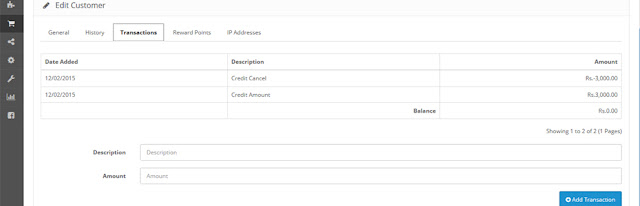
Now you have to give refund to that customer as a credit amount so customer can use that amount in future.

For that do following:

1.Go to customers section
2.go to that particular customer
3.There, you will see “Transactions” tab. Press it and enter amount and description. Click Add Transaction.
4.That’s it. Now your customer get credit and mail also send to that customer (Tested in OP 2)

Saturday, October 22, 2016

Validation of viewstate MAC failed.

Validation of viewstate MAC failed. If this application is hosted by a Web Farm or cluster, ensure that <machineKey> configuration specifies the same validationKey and validation algorithm. AutoGenerate cannot be used in a cluster.


Hello Friend, I have face this issue many time on online live website project.

Solution : 

Set the machinekey in the web config file.

If you want to generate the machinkey as per .net framework or see the below generated key.


Framework version

Asp.net 1.1

<machineKey validationKey="4B6124F1A96C1D90C2EB5298094895EBB9B1AB2227971EAC82E46D6E9B3E9
76CE56A7629E8C4E6C1AEF7A3B4F47681B60119D792EA47613971729564072DEB2A"
decryptionKey="4DD6849D7B818F86F6566B4AEDF1A9BD134DA1994236F8B8"
validation="SHA1" /> 

Asp.net 2.0

<machineKey validationKey="713BBE182A80928A389952B90A305817D43D87DF110B8F1BF4CF3D5628013F
8F93460838C28092EE99106FA2056191A9E3D9D4412607ADB55FE61193CFE30112"
decryptionKey="146AEAA8D1D915B020764CAF11EBD91A4C63B7D8898D13BDA7915F2E14E
92B41" validation="SHA1" decryption="AES" />


Asp.net 4.0

<machineKey validationKey="9BDD1AED72B3669A61961D2E1140865B6737FD394BCA2F4923C90F23CDCF
EE4E522A6E63EF6DA2BCD2DF736C917BBD47EEDCC570B46A623906334757A53ACF21"
decryptionKey="628176C339754EFADF3449C40A400ED185EC0DEBE8290331E3BD70AF463B
BDFA" validation="SHA1" decryption="AES" />


Asp.net 4.5

<machineKey validationKey="4047C7FA412278CF4A5D19BC670739DC9526FFB72F96C29D37A58807E1E4D8
374B6A19C97F7F27C73DB8AC81F5FA389138A9EB3F4752A578035966D5763BB72D"
decryptionKey="93BD9A1F3D1281400E1F5A3CCFF831F1249DC86930226D6B987E00007B989
DD5" validation="SHA1" decryption="AES" />


Monday, October 17, 2016

How to delete one array element from array

i) unset() method


$Array = array("test1","test2","test3","test3");

unset($Array[2]);

ii) array_diff_key() method


$Array = array("test1","test2","test3","test3");

array_pop($Array);

iii) array_splice() method


$Array = array("test1","test2","test3","test3");

array_splice($Array,1,2);

iv) array_diff() method


$Array = array("test1","test2","test3","test3");

array_shift($Array);

Saturday, October 15, 2016

Primary key in SQL Server

Primary key is a single field or combination of fields that uniquely defines a record.
None of the fields that are part of the primary key can contain a null value.
A primary key column cannot contain NULL values.
Each table can have only ONE primary key.

We can create a primary key in table with the CREATE TABLE statement.
Syntax

The syntax to create a primary key using the CREATE TABLE statement:

CREATE TABLE table_name
(
  column1 datatype { NULL | NOT NULL } PRIMARY KEY,
  column2 datatype { NULL | NOT NULL },
  ...
 
);

Example :

CREATE TABLE Persons
(
Employee_Id int NOT NULL PRIMARY KEY,
LastName varchar(255) NOT NULL,
FirstName varchar(255),
Department varchar(255),
Salary money
)


DROP a PRIMARY KEY Constraint

We can also drop the PRIMARY KEY constraint, using the below example:

ALTER TABLE Employee
DROP CONSTRAINT pk_EmployeeID

Friday, October 14, 2016

How To Set Textbox1 Value Into Formula Field Of Cystal Reports.


As per client requirement he/she want to selected date dispaly on report(Crystal Report).

Solution : 

Step1 : I have create one formula field "mindate" and "maxdate" in crystal report.

Step2 : Create the instance of the reports class and set the texbox value in crystalreportviwer source.

Example : 

I have used as per my code in aspx.cs in code page.

CrystalReportSource1.ReportDocument.DataDefinition.FormulaFields["mindate"].Text = "'" + Search_FromDate.Value.Trim() + "'";
CrystalReportSource1.ReportDocument.DataDefinition.FormulaFields["maxdate"].Text = "'" + Search_ToDate.Value.Trim()+ "'";
CrystalReportViewer1.ReportSource = CrystalReportSource1;

Note ["mindate"] ,["maxdate"] is the formula field name. which provided into crystal reports.

Result: See Below Image


Thursday, October 13, 2016

#C# Why Task introduced in C#?

Why Task introduced in C#?
.net framework provides System.Threading.Tasks.Task class to let you create threads and run them asynchronously. Queuing a work item to a thread pool is useful, but there is no way to know when the operation has finished and what the return value is.So that the reason Microsoft introduced the concept of Task.
Task is an object that represents some work that should be done.

Example:

public class Program {
    public static void Main() {
        // use an Action delegate and named method
        Task task1 = new Task(new Action(printMessage));
        // use an anonymous delegate
        Task task2 = new Task(delegate { printMessage() });
        // use a lambda expression and a named method
        Task task3 = new Task(() => printMessage());
        // use a lambda expression and an anonymous method
        Task task4 = new Task(() => { printMessage() });

        task1.Start();
        task2.Start();
        task3.Start();
        task4.Start();
        Console.WriteLine("Main method complete. Press <enter> to finish.");
        Console.ReadLine();
    }
    private static void printMessage() {
        Console.WriteLine("Hello, world!");
    }

}

Wednesday, October 12, 2016

#C# Ref Parameters vs. Out Parameters in C#


Ref Parameters vs. Out Parameters in C#


Ref: The ref keyword is used to pass an argument as a reference. This means that when value of that parameter is changed in the method, it gets reflected in the calling method. An argument that is passed using a ref keyword must be initialized in the calling method before it is passed to the called method.

Out: The out keyword is used to pass an argument as a reference. This means that when value of that parameter is changed in the method, it gets reflected in the calling method. An argument that is passed using a out keyword not to be initialized in the calling method before it is passed to the called method.

Before calling the method:
[ref]: The caller must set the value of the parameter before passing it to the called method as shown below example int I = 20;
[out]: The caller method is not required to set the value of the argument before calling the method. Most likely, you shouldn't. In fact, any current value is discarded as shown below example int K = 10;

During the call:
[ref]: The called method can read the argument at any time.
[out]: The called method must initialize the parameter before reading it.

Remote calls:
[ref]: The current value is marshaled to the remote call. Extra performance cost.
[out]: Nothing is passed to the remote call. Faster.

Example : class Program
    {
        public static void Main()
        {
            int i = 20;
            int k;
            Display(ref i);  //
            Display2(out k);
            Console.WriteLine("current ref value :" + i);
            Console.WriteLine("current out value :" + k);
            Console.ReadLine();
        }
        public static void Display(ref int i)
        {
            i = 10;
        }

        public static void Display2(out int i)
        {
            i = 10;
        }

    }
Output: Current ref value: 10
            Current out value: 10